Still running Windows on a Hard Drive? Stop. Here is the real-world breakdown of SSD vs HDD speed for daily use—and why an SSD is the single best upgrade for any PC.
SSD vs HDD: Which Is Faster for Daily Use? (The “Spinning Rust” Test)
If your computer takes 5 minutes to turn on, you don’t need a new computer. You just need to ditch the Hard Drive.
We have all been there. You click the Chrome icon. You wait. You sip your coffee. You wait some more. Finally, the window opens.
You assume your computer is “old” or has a “virus.”
90% of the time, the problem is physics.
If you browse the web, use Office, watch YouTube, or play modern games, this comparison applies directly to you.
If you are still using a traditional Hard Disk Drive (HDD) as your main drive, your super-fast Processor (CPU) is sitting idle, waiting for a mechanical arm to physically find data on a spinning plate.
When comparing SSD vs HDD speed for daily use, the answer isn’t just “SSD is faster.” It is that for modern operating systems, HDDs are no longer practical.
⚡ Quick Answer: The Speed Gap
SSD (Solid State Drive): Uses flash memory (no moving parts).
Boot Time: 10–20 seconds.
App Launch: Instant.
Verdict: Mandatory for Windows/macOS.
HDD (Hard Disk Drive): Uses spinning magnetic platters.
Boot Time: 60–120+ seconds.
App Launch: Sluggish.
Verdict: Good only for storing photos, videos, and backups.
| Task | HDD (Hard Drive) | SSD (Solid State) |
| Windows Boot | 2–3 minutes | 10–20 seconds |
| App Launching | Laggy (Wait times) | Instant |
| Updates | System freezes | Silent background process |
| Noise | Audible spinning/clicking | Silent |
| Best Use | Mass Storage (Photos) | Daily OS & Programs |
At BinarySpur, we have a rule: Friends don’t let friends boot from spinning rust.
After upgrading hundreds of older PCs, we’ve seen SSD swaps outperform RAM and CPU upgrades in real-world daily use every single time.
Here is the breakdown of why the SSD is the single greatest upgrade in PC history.
1. The Technology: “Record Player” vs. “Flash”
To understand which drive is faster for everyday computing, look at the mechanics.
-
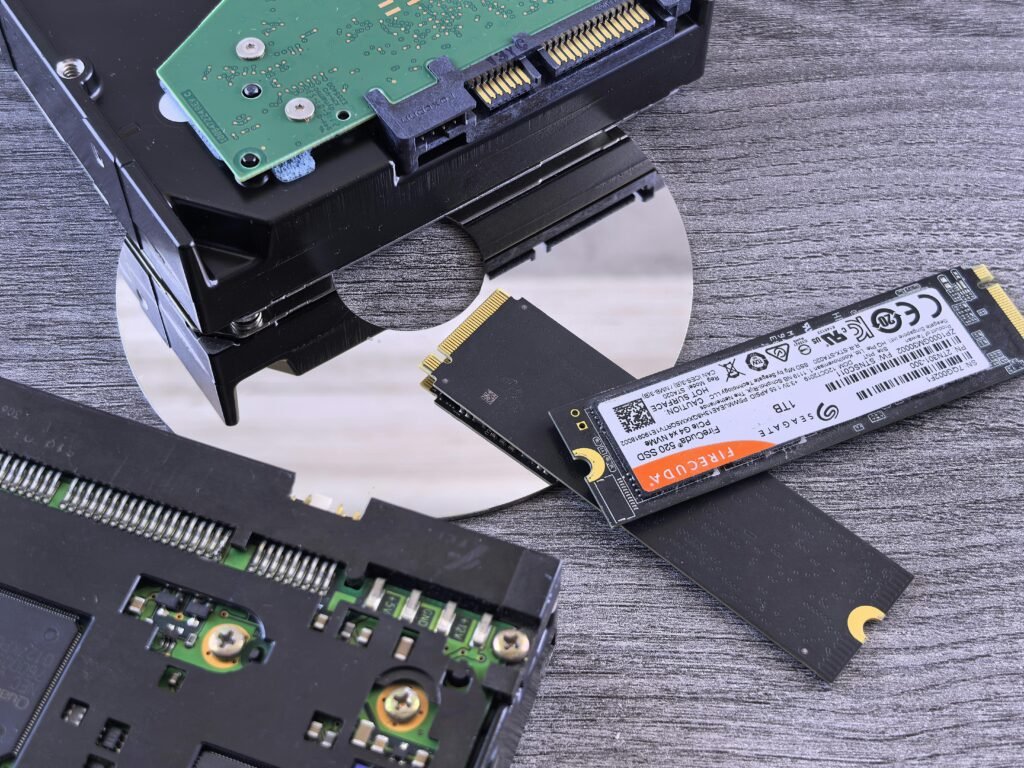
The HDD (The Record Player): Inside an HDD, a metal platter spins at 5,400 or 7,200 RPM. A mechanical arm moves back and forth to read data.
-
The Bottleneck: If you need to open 50 tiny files (like when Windows boots), that arm has to physically jump to 50 different spots. This creates Latency.
-
-
The SSD (The Chip): An SSD is essentially a giant, high-quality USB stick plugged directly into your motherboard. There are no moving parts.
-
The Advantage: It can access file #1 and file #1,000,000 instantly. There is no “seek time.”
-
Note: Even a basic SATA SSD delivers 90% of the daily-use benefit compared to the more expensive NVMe drives.
-
2. Daily Use Comparisons (The “Feel” Test)
Benchmarks look cool on graphs, but how does it feel when you are actually working?
The Boot-Up Test
-
HDD: You press power. You see the Windows logo. You wait. The desktop appears, but you can’t click anything yet because the background apps are still loading. Total time: 2–3 minutes.
-
SSD: You press power. You blink. You are at the login screen. You type your password, and Chrome is ready instantly. Total time: 15–20 seconds.
The “Updates” Nightmare
Windows Updates are notorious for taking forever. On an HDD, the drive hits “100% Usage” and freezes the entire PC while it writes files. On an SSD, updates happen silently in the background. You barely notice them. Once you have the speed, you can further maximize your workflow with these [[iPhone shortcuts everyone should know]].
The “Updates” Nightmare
Windows Updates are notorious for taking forever. On an HDD, the drive hits “100% Usage” and freezes the entire PC while it writes files. On an SSD, updates happen silently in the background. You barely notice them.
Gaming: Frames vs. Loading
-
Myth: “SSDs give you more FPS.”
-
Fact: An SSD will not make your graphics look better. However, it will make the loading screens vanish.
-
HDD: Wait 60 seconds to enter the match.
-
SSD: Wait 5 seconds. (In open-world games like Cyberpunk 2077, an SSD is now a minimum requirement to prevent texture popping).
-
3. When is an HDD Actually Better?
If SSDs are so great, why do HDDs still exist? Price per Gigabyte. SSDs are expensive to manufacture. HDDs are cheap.
-
1TB SSD (NVMe): ~$60 – $80
-
4TB HDD: ~$70 – $80
The Strategy: Use the Hybrid Setup.
-
C: Drive (SSD): Install Windows, Chrome, and your favorite games here. (250GB – 1TB).
-
D: Drive (HDD): Store your 10 years of family photos, movies, and backups here. (2TB+).
Real-Life Micro-Story: The “Broken” Laptop
“A client brought in a 3-year-old laptop. She said it was ‘unusable’ and wanted to buy a new $800 one. I opened Task Manager. Her Disk Usage was stuck at 100%. It had a 5,400 RPM HDD. I cloned her data to a $40 SSD and swapped it out. She called me the next day: ‘What did you do? It’s faster than when I bought it!’ Lesson: The laptop wasn’t slow. The storage was.”
Final Thoughts: The Single Best Upgrade
If you are asking SSD vs HDD which is faster for daily use, the debate is over. For the operating system (Windows/macOS), the HDD era has passed. If you have an old PC that feels slow, do not buy more RAM. Do not buy a new processor. Buy an SSD.
It is the only upgrade that will make an old computer feel brand new.
(If you are upgrading your drive, you will need to reinstall Windows. Follow our guide on [[How to Create a Bootable USB Drive]] to get the installer ready).
Frequently Asked Questions
Is NVMe faster than SATA SSD?
Technically, yes. NVMe drives (the little sticks) are 5x-7x faster than SATA SSDs (the rectangular bricks) on paper. However, for daily use (web browsing, office work), the difference is barely noticeable. Going from HDD to SATA SSD is a massive jump; going from SATA to NVMe is a minor luxury.
Do SSDs wear out?
Yes, but don’t worry. SSDs have a limited number of “writes” (TBW). However, for a normal user, it would take 10+ years of heavy daily use to reach that limit. The controller usually dies before the memory does.
Can I use an HDD for gaming?
For older games, yes. If you play League of Legends or Minecraft, an HDD is fine. But for modern AAA titles like Starfield or GTA VI, an SSD is often listed as a “Requirement,” not just a recommendation.